Everything you need to know about single-shot vs multi-shot prompting

Highlights
AI prompting used to be pretty straightforward. You write a prompt, you generate a result, and you keep generating until you get the result you’re looking for (or close enough).
This approach works when you need something rough, or for testing, but isn’t as great as when you need something more final or consistent.
Enter multi-shot prompting. These multi-step prompts give you much more control over your output, rather than just generating and hoping for the best.
In this article, we’ll break down two common AI prompting methods, single-shot and multi-shot prompting, and explain when you should use each.
What’s single-shot prompting?
Single-shot prompting is the standard where you enter one prompt, describing what you want to generate, and you get one result. If you want to adjust it, you tweak the prompt and regenerate.
Single-shot prompts are great for testing out ideas, drafting, and creating mockups, because they don’t usually give you perfect results. Even using the exact same prompt with the same model consecutively can give you a completely different output.
Consistency isn’t a strong point of single-shot prompts. If you’re looking to create a series of images using the same details, such as character, clothing, poses, or otherwise, that’s where you might notice changes.
Prompt: “A realistic magazine-style portrait of a three-floored multi-colored doll house in a girl’s bedroom. Inside the dollhouse is a family of hamsters, using the house like a human family would.”

In this single-shot image, generated by GPT Image 1.5, there are no clear directed camera angles, lighting, or complex details added.
When those complex details are added to the same prompt, the model doesn’t fully comply:
Prompt: “A realistic magazine-style portrait of a three-floored multi-colored doll house in a girl’s bedroom. Inside the dollhouse is a family of hamsters, using the house like a human family would. Uplighting, low-angle shot.”

The uplighting here isn’t truly uplighting, and the results aren’t consistent. You can see small details have changed, such as the window by the front door, the accessories outside the front door, and some items around the house. Most importantly, the text in the newspaper hasn’t been rendered correctly in both images.
What’s multi-shot prompting?
Multi-shot prompting is where you add more detail and structure to your prompt, for better control over the output. Sometimes it’s referred to as multi-shot prompting for creators, as you give the model a few prompts in one instead of single prompts.
Instead of giving the model a single description and hoping it gets close, you guide it with examples, references to specific frames, describing camera angles and lighting, or explaining how different parts need to be consistent.
Not all AI models can do this, and the ones that can have their own rules, quirks, and guidelines for negative prompting.
Wan 2.6: Great with reference images
Wan AI image and video models are both great for multi-shot prompting — just be careful of over-prompting.
This model really likes to fill in the gaps, meaning if you don’t specifically mention something, Wan 2.6 will take the liberty of deciding what you might have wanted to see. This might be very different from what you were thinking of, therefore it’s best to add in the details you’re fixed on.
Prompt: “Modern glass-walled corporate boardroom at night, long walnut conference table, city skyline visible outside, overhead warm boardroom lighting, cinematic realism. Primary character: raccoon CEO - Dark gray fur with subtle silver highlights - Sharp brown eyes - Wearing navy tailored business suit, white shirt, burgundy tie - Small gold name badge on left lapel Secondary characters: - Red fox CFO in charcoal suit - Barn owl legal advisor wearing round glasses - Squirrel intern with tablet. Camera: Eye-level boardroom perspective.”

Wan 2.6 Image
Wan 2.6 Video
Grok Imagine: Best for character consistency
Grok Imagine’s image and video models are both super attuned to character details, and keeping them consistent across generations. For example, you could describe a character’s look, outfit, pose, and background, and these will stay the same even as you tweak your prompt.
Prompt: “Male delivery courier, mid-30s. Olive skin tone. Short dark hair. Light stubble. Green bomber jacket with orange stripe on sleeve, black cargo trousers, carrying a messenger bag with circular red logo.
Scene 1: Medieval stone castle courtyard, overcast lighting, horses and guards in background. Scene 2: Tokyo street, night rain, glowing holographic billboards.
Scene 3: 1990s suburban shopping mall interior, fluorescent lighting, tiled floors.”
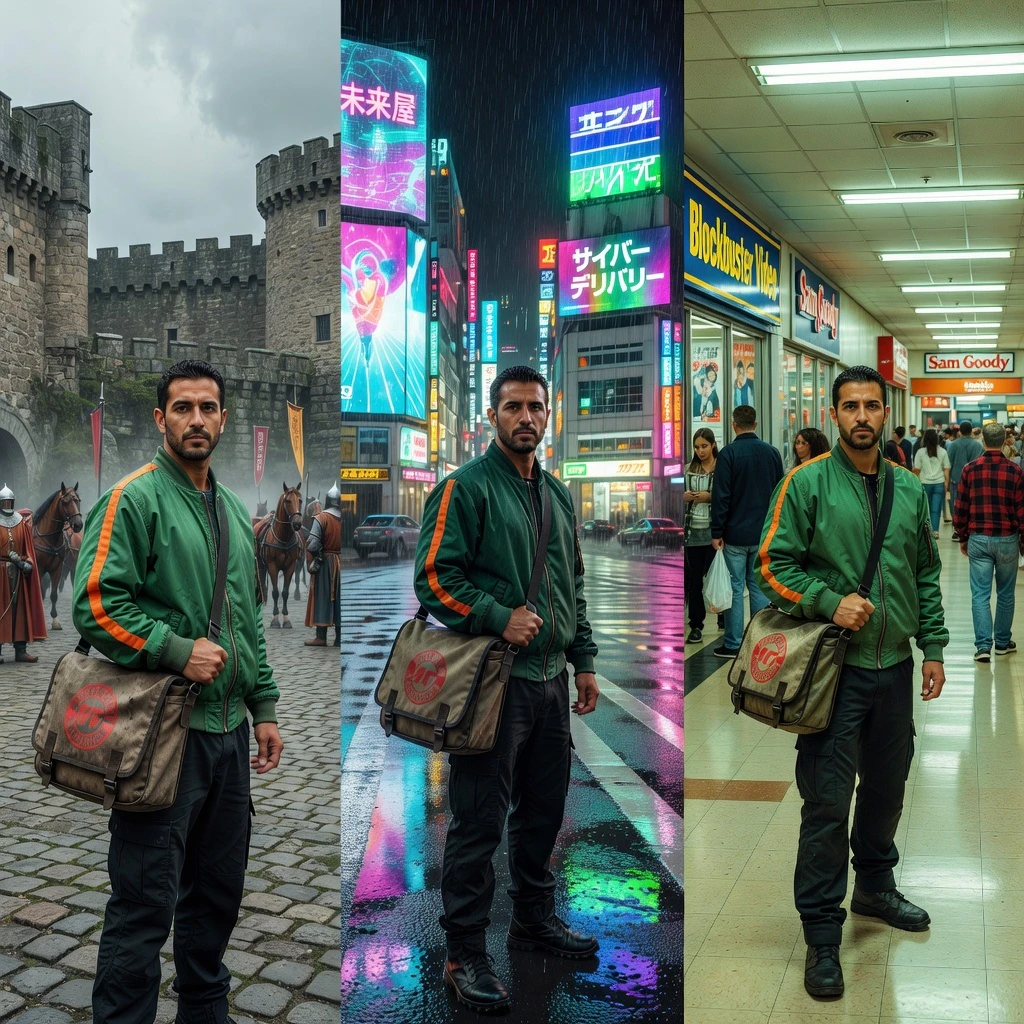
Grok Imagine Image
Grok Imagine Video
Kling O3: solid scene control
Kling O3’s image and video models are known for their high levels of control across scenes. You can prompt for character movement, camera angles, lighting continuity, and scene progression. It’s more like an all-in-one film production.
Prompt: “Professional news anchor, navy suit, white shirt, red tie. Standing waist-deep inside a volcanic crater, lava glowing around him.
Lighting: Orange underlighting from lava, ash particles floating in air.
Text: Lower-third banner: "BREAKING: Eruption Update”.

Kling O3 Image
Kling O3 Video
Single-shot vs multi-shot prompting: A quick comparison
There’s no right or wrong when it comes to choosing between single-shot or multi-shot prompting, across both image and video models. It’s all about which type of prompting is best for your needs.
Here’s how they both compare.
Single-shot | Multi-shot | |
Speed | Very fast | Slower setup |
Consistency | Details may shift | More stable across scenes |
Text | Text may distort | Clearer text control |
Best for | Drafts, quick visuals | Branding, sequences |
Speed
Single-shot prompts are faster to write, as you type a short description and then generate.
Multi-shot prompts take longer because you’re adding in about the structure, lighting, camera angles and more, as well as describing or choosing your reference images.
Consistency
Single-shot prompts are less consistent across both image and video models. This is because they prioritize speed over consistency and detail.
Multi-shot prompts are much more consistent, across both image and video models, keeping details that you’ve specifically told it to keep consistent.
Text accuracy
Single-shot prompts usually struggle with text inside images, letters may warp or come out spelled wrong.
Multi-shot prompts are much more exact with text, including the spelling, the placement, and even the style of text. That’s not to say that the text always comes out perfectly, but it has a much higher chance than with single-shot prompts.
Prompting tips to get the best out of your model
Across both single-shot and multi-shot prompts, when it comes to prompt engineering for video creators, you need to know how to write prompts clearly to get the best results from your chosen model.
Here are a few tips.
1. Don’t overload a single-shot prompt
If you try to control lighting, camera angle, character continuity, text layout, mood, and scene progression all in one short prompt, it won’t end well. Single-shot prompts just aren’t built for that heavy load.
2. Give a multi-shot prompt a clear direction
Multi-shot prompting only works if you give the model specifics. These can be (all or just some):
- Reference images
- Camera framing
- Lighting placement
- Character details
- Exact text and layout instructions
If your prompt is vague, adding more description won’t improve the results.
3. Use the right model
Not all models work in the same way. Some are better at creating fast visuals, while others are great at consistency or text. You’ll find out very quickly that trying to force a quick, expressive model to create something highly structured, consistent, and high quality, you’re unlikely to get the results you’re after.
Single-shot vs multi-shot prompting: Which should you use?
Single-shot vs multi-shot prompting isn’t about which method is better, but about which type of prompt will give you the result you’re looking for.
Single-shot is fast, flexible, and great for testing. Multi-shot is detail-oriented, consistent, and produces high-quality results.
You don’t need to choose between using single-shot or multi-shot prompts, you can use both at different stages of your workflow. Check out both types of models in Artlist’s AI Toolkit, where you can find a whole range of single-shot and multi-shot image and video models, with more added as more AI tools hit the market.