ImagineArt 2.0: what creators need to know about this new AI image model

Highlights
Table of contents
AI image generators keep improving, and ImagineArt 2.0 focuses on the upgrades creators care about most: stronger prompt accuracy, sharper photorealism, and improved text rendering.
For creators building concept art, storyboards, mockups, or branded visuals, these improvements can make image generation faster and more practical. More accurate prompts mean less time spent regenerating results, while better realism and typography make outputs more useful for presentations, pitches, and early-stage creative work.
Let’s take a look at what ImagineArt 2.0 offers, where it performs well, and how creators can use it to speed up visual workflows.
What is ImagineArt 2.0?
ImagineArt 2.0 is an AI image generation model developed by ImagineArt. According to the platform, it improves on earlier versions with upgrades to image realism, typography, prompt adherence, and multi-format image generation.
These updates are designed to help users create visuals that more closely match their prompts, especially when working with detailed compositions, cinematic lighting, or embedded text. That makes the model useful for creators producing visual references, ad concepts, product mockups, and presentation assets.
Must know technical details
Mode: text to image
Resolutions: 1K, 2K
14 aspect ratio options: 1:1 · 16:9 · 9:16 · 4:3 · 3:4 · 3:1 · 1:3 · 3:2 · 2:3 · 21:9 · 4:5 · 5:4 · 4:1 · 1:4
Languages: All
Stronger prompt adherence means faster iteration
One of the biggest challenges in AI image generation is getting consistent results from detailed prompts. Complex scenes often produce missing elements, awkward framing, or visual inconsistencies.
ImagineArt 2.0 is designed to improve prompt adherence, helping creators generate images that better reflect instructions around lighting, camera angles, and lenses, styling, and composition.
Use this prompt formula for better image results: [Camera/lens] + [Lighting/mood] + [Subject detail] + [Style] + [Composition]
When prompts produce stronger results earlier, creators spend less time refining instructions and more time developing ideas. For teams working on campaign concepts or pre-production visuals, that faster turnaround can make ideation more efficient and help move projects forward sooner.
Try a prompt like: Create a cinematic product photo featuring a luxury wristwatch displayed on a dark, reflective surface. Utilize dramatic studio lighting to highlight the intricate details of the watch, ensuring that the ultra-realistic metal reflections are prominent. The focus should be on creating a shallow depth of field to blur the background, enhancing the watch's features and craftsmanship. Aim for a premium commercial photography style that conveys elegance and sophistication.
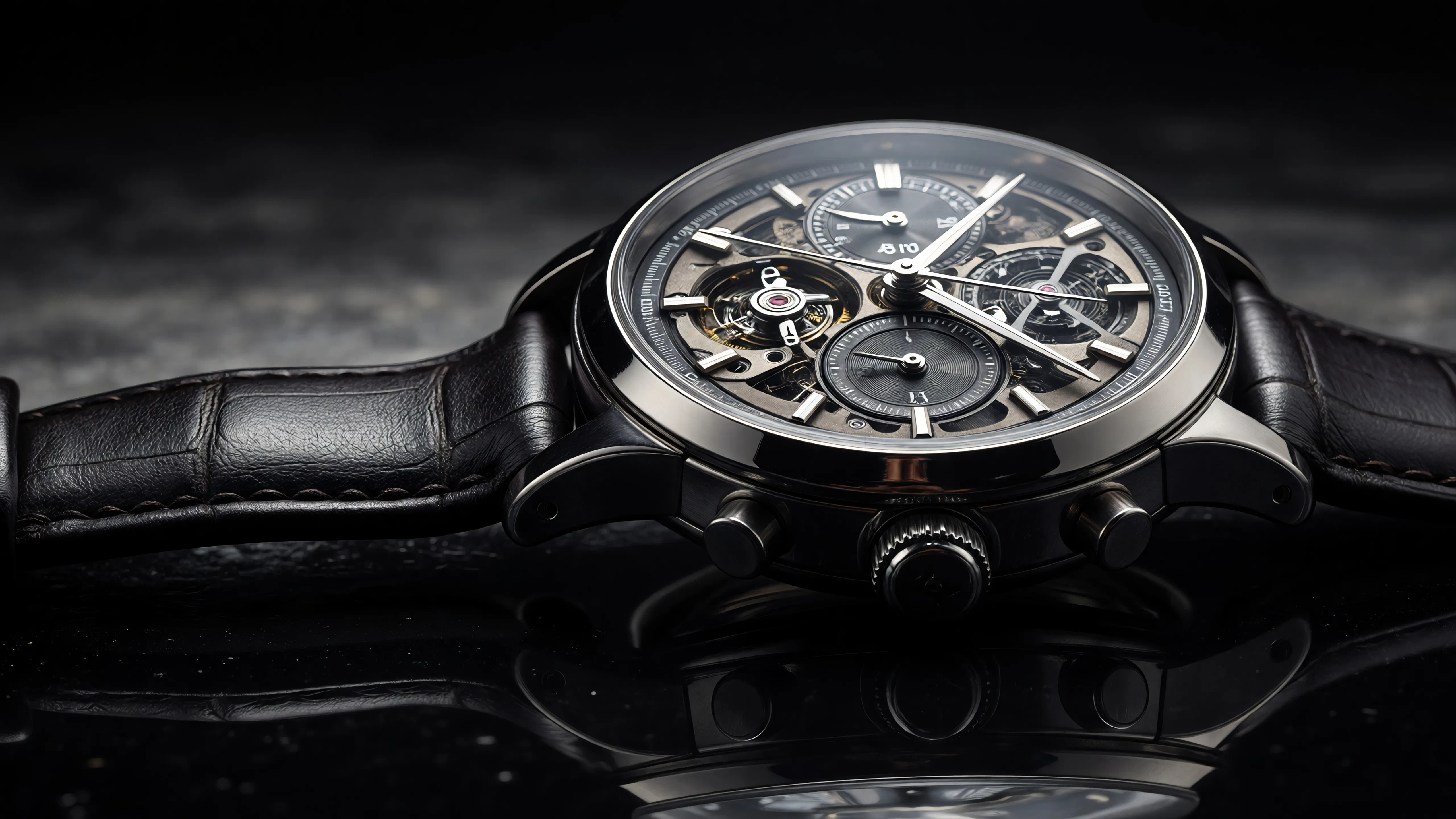
This kind of prompt tests the model’s ability to combine lighting, materials, and commercial styling in one image — and it works!
Better photorealism improves creative mockups
Photorealism is one of the headline improvements in ImagineArt 2.0. The platform highlights improvements in textures, skin detail, reflections, and lighting realism.
For creators, photorealistic generation can make early-stage ideas much easier to present. Whether you’re building pitch decks, moodboards, or client concepts, realistic visuals help communicate creative direction with more clarity.
This can be especially useful for:
- product mockups
- ad concepts
- set design references
- marketing visuals
- social campaign ideation
Instead of relying on rough references, creators can generate visuals that look polished enough to support pitches and internal approvals.
Improved typography opens up branded use cases
Text rendering has historically been one of the weakest areas in AI image generation. Misspelled words, distorted letters, and unreadable layouts have made it difficult to use AI images for branded assets.
ImagineArt 2.0 improves text generation, in any style, language or layout. For creators this will help when creating posters, product packaging, and branded mockups.
For creators working on campaigns or brand visuals, this means you can experiment with layouts that include logos, slogans, and packaging concepts much earlier in the process. It also makes AI generation more useful for teams working on quick creative ideation for paid ads, social campaigns, and visual branding. See this example below:
Prompt: Create a modern fitness campaign poster featuring a runner at sunrise, bold headline text reading ‘Push Beyond,’ clean typography layout, dramatic lighting, premium sports brand aesthetic
Multi-format generation supports cross-platform workflows
Nowadays creators rarely build visuals for one format. A campaign may need landscape visuals for YouTube, vertical assets for social media, and square images for ads.
ImagineArt 2.0 supports multiple aspect ratios, making it easier to generate images tailored to different platforms. That matters because composition changes across formats. A scene that works in widescreen often needs different framing in vertical layouts.
Generating multiple aspect ratios from the same creative direction helps teams move faster when adapting visuals for:
- social ads
- YouTube thumbnails
- presentation decks
- website banners
- story formats
That flexibility makes the model more useful in real production pipelines where content needs to work across multiple channels.
Where ImagineArt 2.0 fits in a creator workflow
ImagineArt 2.0 can be useful in the early stages of creative production, especially when speed matters.
Creators can use it to generate:
- concept art for shoots
- storyboards for client pitches
- product mockups for campaigns
- moodboards for pre-production
- ad concepts for testing creative ideas
These assets can help teams move from idea to execution faster by giving everyone a clearer visual reference point. For video creators, that means generating look references before sourcing footage, selecting music, or editing the final cut. It can also improve collaboration by helping clients and team members align on visual direction before production starts.
How ImagineArt 2.0 compares to GPT Image 2 and Nano Banana Pro
ImagineArt 2.0 enters a competitive field, with models like GPT Image 2 and Nano Banana Pro also offering strong image generation capabilities for creators. Each model has strengths that suit different workflows, so it helps to compare them side by side.
Feature | Imagine Art 2.0 | GPT 2.0 | Nano Banana Pro |
Prompt adherence | Strong | Very strong | strong |
Photorealism | Strong | strong | moderate |
Text | improved | Very strong | moderate |
Style flexibility | moderate | strong | strong |
Best for | Mockups, branded assets | Detailed prompt execution, text-heavy visuals | fast, stylized images |
ImagineArt 2.0 stands out for creators who need photorealistic mockups, branded visuals, and flexible aspect ratios. Its improved prompt adherence and stronger text rendering make it useful for ad concepts, product shots, and pre-production references.
GPT Image 2 performs especially well with detailed prompts and text-heavy compositions. For creators generating visuals that require precise typography or highly structured layouts, it offers strong consistency and reliable prompt interpretation.
Nano Banana Pro is often favored for fast concept generation and stylized outputs. Learn more here about how it can be useful for brainstorming visual directions quickly, especially when realism is less important than speed and creative variation.
Ready to bring your images to life?
ImagineArt 2.0 adds meaningful improvements in prompt adherence, realism, text rendering, and flexible formatting. Those upgrades make it a stronger option for creators who need fast visual ideation for concepts, campaigns, and pre-production workflows. Try it out with the Artlist AI Toolkit today.