Different types of AI models, explained

Highlights
Most creators choose their AI tools based on results, not what’s happening behind the scenes. That makes sense, but the type of model quietly affects how fast it works, how consistent the results are, and how much control you get.
This guide explains the main types of AI models in practical terms, so you can make better workflow decisions without having to get too technical.
What’s an AI model?
Generative AI models are the systems that turn your input into an output, like a text prompt into an image, a script into a voice, or an image into a video.
One tool could be using several models, each best at a different task. For example, one model might be used for generating detailed images, while another handles video, audio, or voiceover.
Different types of AI models
The backend of AI models is constantly evolving. The most common types of models are below.
Diffusion models
Diffusion models are the engines behind most high-quality AI images you see today. Instead of creating an image all at once, they build it step by step, refining detail and style as they go. That’s why they’re especially strong at still visuals where look and control matter.
Diffusion models are best when you need sharp detail, clear style direction, and consistency inside a single image. They’re a strong fit for thumbnails, key frames, concept art, and images that will be reused or animated later. This is the type of model behind AI image generation models like Nano Banana, Nano Banana Pro, and Flux 2.0.
The tradeoff is speed. Because diffusion models work in stages, they’re usually slower than simpler image models, and less suited for long or complex motion on their own. If you need fast drafts or continuous movement, diffusion models are usually used alongside video models later in the workflow.
To show how different AI models interpret the same instructions, we used the same visual prompt to generate the results with different image models.
Prompt: “A young woman mid-dance at a winter nature rave at night, wearing a knitted fairy costume with wings, sequins. Confetti flying in the air, surrounded by fairy lights and greenery.”

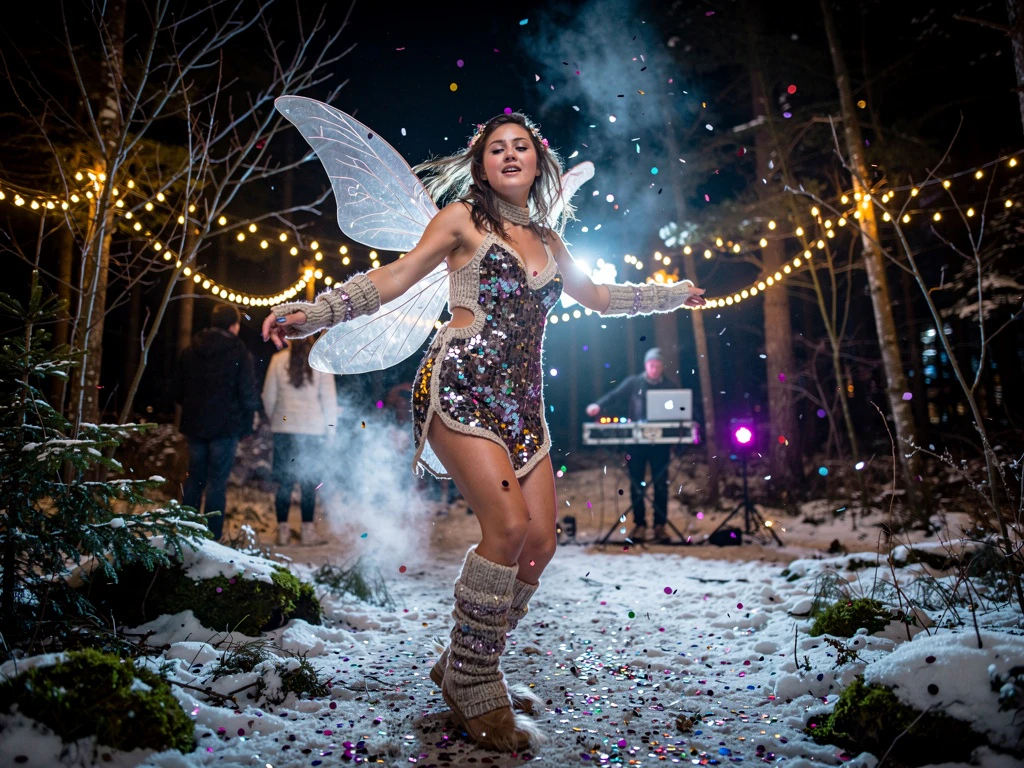
Using the same prompt across different image models highlights how interpretation can change.
In the Nano Banana Pro image, the details are all present, correct, and highly realistic. In the Flux 2.0 Pro image, the result is also hyperrealistic, but the phrase “knitted fairy costume” is interpreted slightly differently, with an outfit that feels less suited to the winter snow on the ground.
RNNs (recurrent neural networks)
RNNs were some of the earliest models used for text, speech, and audio. They helped power early voice tools, basic text generation, and simple sequence-based systems. RNNs work by reading all parts of a sentence together to decide what matters most, which helps to follow instructions and keep the meaning consistent.
Nowadays, RNNs have mostly faded into the background, as newer transformer-based models handle language and timing more accurately, and on a much larger scale.
Transformer-based models
Transformer-based models focus on understanding language, structure, and meaning. They’re built to follow instructions and connect ideas. That’s why so many AI tools use them for prompts, scripts, and voice features.
In practice, this means the model decides which words matter most, keeps context across longer inputs, and follows instructions more reliably than older models. Technically, transformer models use attention mechanisms to weigh relationships between words across an entire input, instead of processing text one step at a time.
In creative workflows, transformers are usually not the part creating the final image or video frame, but shape what happens before this stage. They help interpret prompts, structure scripts, guide voiceovers, and keep longer pieces of content on track. When a tool understands what you’re asking for and responds in a logical way, this is often a transformer model. For example, Artlist’s AI voice tools rely on transformer-style language models, the same class of models behind modern large language tools like ChatGPT-style and Nano Banana-style systems, to interpret scripts and pacing.
These models are strongest when language, timing, and structure matter more than visual detail. They’re a natural fit for writing, narration, planning, and anything that unfolds over time rather than in a single frame.
GANs (generative adversarial networks)
GANs are a type of AI model made of two networks, one that creates images, and the other checks them for realism. GANs were some of the first models to produce realistic-looking AI images. They’re known for sharp results, especially in faces, textures, and style-heavy visuals. Many early AI art tools were built on GANs, and their influence is still felt today.
Creators don’t usually choose a GAN directly; instead, they use GAN-style techniques as part of other image tools during enhancement steps, such as sharpening details, improving realism, or cleaning up results. Some faster image-generation paths still borrow GAN-style techniques for sharpening and realism. This is why some tools might feel very fast and visually striking, even if they offer less control overall.
GANs work best for quick, single images where realism matters more than consistency. They’re less suited for projects that need repeatable results across many generations, like brand visuals or multi-frame work.
VAEs (variational autoencoders)
VAEs help models remember the structure of an image, so it doesn’t fall apart or shift unexpectedly when you edit, refine, or reuse it. VAEs don’t usually create final images or videos on their own. Instead, they help organize and stabilize what other models produce.
VAEs are best at compression, smooth transitions, and keeping images and videos from breaking apart as you refine or reuse an image. They’re usually incorporated into more advanced image models.
This approach supports better consistency and cleaner edits, especially when you’re making changes across multiple versions of the same visual. Models like Nano Banana Pro rely on this kind of structure to feel more predictable and easier to work with over time.
Multimodal models
Multimodal models understand more than one type of input at the same time. Instead of treating text, images, video, and sometimes audio as separate steps, they connect them into a single flow.
These models can go from prompt to image, then image to video, without needing to start over each time. They’re good for early-stage creation, storyboarding, and fast concept development, where speed matters more than perfect detail.
But, because multimodal models cover many formats at once, they’re not always as specialized as a separate image or AI video model. That’s why creators usually use them to move fast early on, then switch to more focused models later. For example, Veo 3.1 is a text to video model that also adds audio to the video output. It’s a good, quick option for creating a rough draft, but what you gain in speed you lose in control, and it can be inconsistent with details each time you tweak your prompt or regenerate from scratch.
The following prompts show how a multimodal video model interprets the same scene with different levels of detail.
Prompt: “A young woman mid-dance at a winter nature rave at night, wearing a knitted fairy costume with wings, sequins. Confetti flying in the air, surrounded by fairy lights and greenery.”
This Veo 3.1-generated video, using the Nano Banana Pro-generated image from above, adds movement and audio. But the prompt didn’t state what type of movement or audio, so the model made a decision.
Prompt: “A young woman mid-dance, hands twirling in the air, at a winter nature rave at night, wearing a knitted fairy costume with wings, sequins. Confetti flying in the air, surrounded by fairy lights and greenery. Hardcore drum and bass music playing.”
Why one model can’t do it all
Every AI model is trained with tradeoffs. Some are optimized for speed, others for detail, others for structure or consistency. Pushing a model to excel at everything usually means it performs less reliably at the thing you actually care about.
That’s why “all-in-one” AI tools still rely on multiple models behind the scenes. One model might interpret your prompt, another generates the image, and another handles motion, audio, or refinement.
For creators, this isn’t a limitation, it’s how creative workflows are supposed to work. You move fast with a general model early on, then switch to more specialized models when quality, consistency, or reusability matters.
This is also where AI generation is heading. Instead of one model doing everything, newer tools are combining multiple specialized models behind the scenes, each handling the part it’s best at. The result isn’t a single “perfect” model, it’s workflows that give creators more control as projects move closer to production.
Just like you wouldn’t use the same camera for every shot or the same plugin for every edit, when using AI, don’t expect one model to create everything from idea to final export. The key is to understand the strengths and limitations of each model so you can switch to the right model based on what your project needs.
Which AI model should you use?
The right AI model depends less on what you’re making and more on where you are in the process. Early on, speed and flexibility usually matter most. Multimodal models like Veo 3.1 work well here because they let you move quickly from a prompt to an image, then create videos from those images, without starting over each time.
As a project becomes clearer, your needs change. Diffusion models are a better fit when images need to stay consistent across changes, branding, or animation. More focused video and audio models matter later, when timing, realism, and publishing standards affect the final result.
Most professional creators don’t choose one model and stick with it. They switch on purpose. The model you use affects how much time you spend fixing details, how stable the results feel, and how ready the work is to share or publish.
Model knowledge is a creative skill
Knowing how different AI models behave shapes how you plan, adjust, and finish a project. It lets you move fast when speed matters, slow down when quality matters, and avoid extra fixes that cost time later.
Most modern creative workflows already rely on several models, even if that complexity stays hidden. The real advantage isn’t finding one perfect AI model for creators, it’s knowing when to switch tools as the work takes shape.
That’s why platforms like Artlist bring you a whole Toolkit of AI tools to use in a single workflow. When the tools are built to support finished creative work, you can spend less time managing limitations and more time making clear creative decisions.