Make any image black and white in one click
Drop in any photo and turn it black and white in seconds. Artlist's black and white filter does more than drain the color it rebuilds contrast and tonal depth for a true monochrome look, not a flat, washed-out one. It works on portraits, landscapes, and product shots at full resolution. No editing skills, no Photoshop just upload, apply, and download.

What is a black and white filter?
A black and white filter removes color from an image and renders it in shades of gray, from pure black to bright white. Artlist's filter uses AI to rebuild contrast and tonal range, so your photo reads as intentionally monochrome not just desaturated. Use it to set a mood, focus attention on your subject, or give any shot a timeless feel.
What the black and white filter can do?
More than a grayscale toggle. It's a one-click way to make a photo black and white with real depth, detail, and a finished, cinematic look.
True cinematic contrast
Instead of flatly draining the color, the filter rebuilds light and shadow to deepen blacks, lift highlights, and hold detail in between the difference between a grayscale image and a real black and white one.

Works on any photo
Portraits, landscapes, street shots, product photos, old family pictures upload any image, in any format, and convert it to black and white without cropping or quality loss.
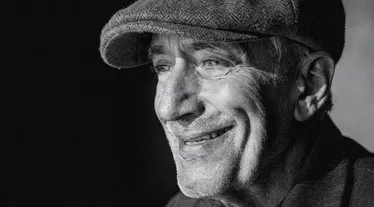
Full-resolution output
Download your black and white image at full resolution, ready for social, print, a portfolio, or a client deliverable. What you upload is what you get back just in monochrome.


Who uses the black and white filter?
Black and white is a creative choice as much as a look. it removes distraction and puts mood, form, and emotion first. Whether you're polishing a feed, building a portfolio, or restoring a memory, the filter gives you a clean monochrome result in seconds.
Frequently asked questions
It's an online tool that turns any image black and white in one click. You upload a photo and the AI converts it to monochrome, rebuilding contrast and tonal range so the result looks intentionally black and white not just stripped of color. It's part of Artlist's AI creative toolkit.
Upload your image, apply the black and white filter, and download the result no editing skills needed. The tool handles the conversion automatically, so you don't have to adjust sliders or settings to get a clean monochrome photo.
Almost any image works, but high-contrast scenes shine: portraits, architecture, street photography, landscapes with strong skies, and product shots. Black and white removes color distractions, so images with clear shapes, texture, and light-and-shadow tend to look the most striking once converted.
Still have questions? We're here to help.